
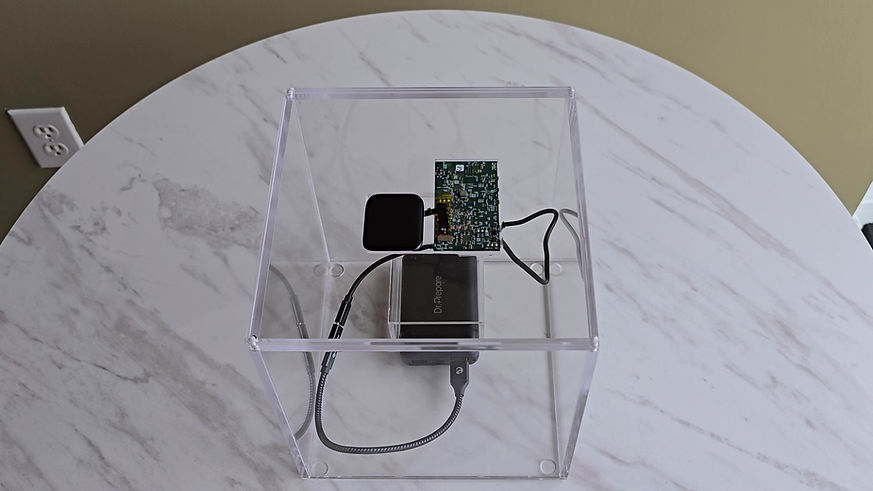
O Mini Server Demo
O Mini Server delivers computing power, security, encryption, accessibility, and flexibility all while keeping your data out of the cloud. With one device the size of a wristband, you can remove or backup data from any of your devices, and access it all directly from O Mini Server.
With O Mini Server in control of your data, you have a computer server with you at all times so
you can share, store or access all your information from any device that only belongs to you.
Step 1 - Turn on O Mini Server

O Mini Server is now powered
All systems ready to go


Step 2 - Establish a connection with each of your devices.
Now, link your O Mini Server to your phone, tablet, laptop, or any other computing device that you use to store and access your data.

Connect with Bluetooth & Wifi.
Communicate
with all your devices
Send & Receive Data

Connect your devices via O App
O Mini Server will recognize your devices.
To connect your devices, first install & launch O App, then search for your O Mini Server and pair devices with your system. This is a crucial step towards preventing malicious access to your data.
O Apps installed on devices or operating systems have no information or data. The only way to transfer data is by connecting your device to your O Mini Server. The moment you loose the connection between your device and your O Mini Server, that data is gone and no longer accessible.
Our technology protects your most private information from Fortune 500 companies that want your personal & business data.


01
The Laptop O App discovers O Mini Server

02
O Mini Server generates a code for pairing devices

03
Add O Mini Server code to the Laptop

04
O Mini Server and the Laptop are now paired


01
The Phone O App discovers O Mini Server

02
O Mini Server generates a code for pairing devices

03
Add O Mini Server code to the Phone

04
O Mini Server and the Smartphone are now paired


01
The Tablet O App discovers O Mini Server

02
O Mini Server generates a code for pairing devices

03
Add O Mini Server code to the Tablet

04
O Mini Server and the Tablet are now paired
Once a connection is established, information can flow back-and-forth between O Mini Server and your connected devices instantly, securely, and all without a network, 5G connection, or public wifi—even on an airplane, bunker, submarine or the moon.
Step 3 - Choose your way to manage your data.
Now that your devices are connected, recognized and accepted by your O Mini Server, you have three ways to manage each device. Each method allows you to either erase or back up each device, or simply have your device access the information stored on O Mini Server via O App.

Your devices are now
added to O Mini Server System,
secure and configured for you.
O System can be configured with precision. You can select the mode that fits your specific needs. Erase on one side, back up on another or just access all of your data on O Mini Server.
Total Control mode
Transfer all your data here and erase it everywhere else.
Erase all your data on the CLOUD
Erase all your data on any DEVICE
Back Up mode
Back up & Synchronize data or files with any device.
Back up & Synchronize all your data with any DEVICE
No need for CLOUD
or Cloud account
Just Connect
Access all your data from any device
Connect any DEVICE to O Mini Server to access all your data
Choose your mode
01
02
03
Total Control mode
Transfer all your data here and erase it everywhere else.
Back Up mode
Back up & Synchronize any data or file with any device.
Just Connect
Access all your data from any device
Erase
on the cloud
Erase
on any device


04
O Mini Server will start to retrieve your data from your DEVICE & CLOUD to send to your O Mini Server to lock and secure. Now your data is off of your DEVICE & CLOUD.

Transfer
&
Erase
all data on your DEVICES & the CLOUD.
01
All your data like Emails, Contact, Text messages, Calendar, Pictures, Videos, Music, Documents, & any types of Files are on your DEVICE.

02
Go on the O App where your device is registered on
O Mini Server

03
On the O App, configure what data & information you want to erase on your DEVICE & CLOUD.
02
Go on the O App where your device is registered on
O Mini Server
No need to have the cloud or cloud account
Back up & synchronize on any device

04
O Mini Server will start to back up & synchronize data on your DEVICE by sending it to your O Mini Server to lock and secure. Now your data is always copied in O Mini server and not on the CLOUD.

Back up
&
Synchronize
all your data on your DEVICES.
01
All your data like Emails, Contact, Text messages, Calendar, Pictures, Videos, Music, Documents, & any types of Files are on your DEVICE.


03
On the O App, configure what data & information you want to back up & synchronize on your DEVICE.
01
Connecting one device or multiple devices at the same time to your O Mini Server. Once connected you will have instant access to your data.

02
Go on the O App where your device is registered on
O Mini Server
03
On the O App,
give permission to your device to gain access to your information.

Connect
any DEVICE
to access
all your data on O Mini Server.

Your device connects to your O Mini Server to gain access to your Data. Connect one or more devices to O Mini Server at the same time and access all your data in a blink of an eye.
Your data is now erased on your device & off the cloud, securely stored on O Mini Server.
+
You have access to all the
data that has been synchronized
in Back Up Mode.

Your data on your device is now backed up & synchronized with
O Mini Server. No cloud needed.
+
You have access to all the
data that has been transferred
in Total Control Mode.

You can now disconnect from the cloud.
O Mini Server will take it from here.
All your devices are now configured on O Mini Server. You no longer need the cloud. Feel free to disconnect and unsubscribe from all of your cloud accounts. There will be no more sharing of information like phone numbers and emails—or multiple passwords to remember, painful double identification, cloud subscriptions or simply losing control of your data.
Fortune 500 companies can no longer monetize your information—and by owning your data and removing it from cloud systems, you gain absolute control and privacy.
O Mini Server is at the center.
With any device configuration,
everything is at your fingertips.


Own your data. Secure it in style.
Your digital world is now out of the cloud, in your control, and strapped to your wrist wherever you go.
Unleash the power of O Mini Sever. When your data is under your control, you can move it out of the cloud and make it undetectable, all from your wrist. O Mini Server is portable and virtually impenetrable. Now, you own your data, leaving the cloud behind and unleashing true privacy.


All your data is now secure & encrypted. Only you can access it—at any time.
Freedom in secutiry
O Mini Server is your own private server for all your email accounts, contacts, text messages, calendars, music, crypto keys, and all of your other files—and it's all with you at all times. Your personal and business information is now safe. O Mini Server is the center of your digital world. You can access it
with your phone, tablet, laptop, or any other computing device, off the network & out of the CLOUD.

Send, receive, erase, manage & store
all your emails from various accounts.


Add, modify, erase, share & store
all your contact.


Write, erase & store all your
text messages.

Write, modify, erase, share & store
all your calendars & schedules.


Store all your crypto keys.

Access, modify, stream, share & store
all your files.


Create playlist, access, modify, stream,
share, & store all your music.


With all your data on O Mini Server, just connect with a device for all your daily digital needs. You can share, send, modify, erase, copy—do it all with O Mini Server.
Own your data. After all, it's yours.
O Mini Server is incredible
power on your wrist.
Stream your favorite music, video, series & movies on any device, in any situation, anywhere in the universe.
Stream to one device or up to two devices at the same time.
O Mini Server can stream your movies, series or videos to all of your devices instantly. No need to be connected over the internet.
O Mini Server


Stream your music on a device, headset or any sound system with Bluetooth.
O Mini Server can stream your music or playlist to all your devices instantly. No need to be connected over the internet.
Volume up
Volume up

O Mini Server


Volume up
Volume up
O Mini Server exists for your privacy.
We got you covered.

Total Control mode
Back Up mode
Just Connect
Transfer all your data here and erase it everywhere else.
Back up & synchronize any data or file with any device.
Access all your data from any device.
All your data on O Mini Server gives you private access anywhere in the world.
Connect any DEVICE to O Mini Server.


Store, create, modify, share, copy, transfer, back up, erase and do what you want with your data.
O Mini Server is a computer server on your wrist.
Attribute icon design to
Full Demo O Mini Server
